
Platform
Manage labels more efficiently with a more intuitive interface
The Labels section in Settings has a new interface. Content labels, content label groups, and profile labels now use the same list-and-panel layout as other Settings sections, so labels work the way the rest of Settings does.
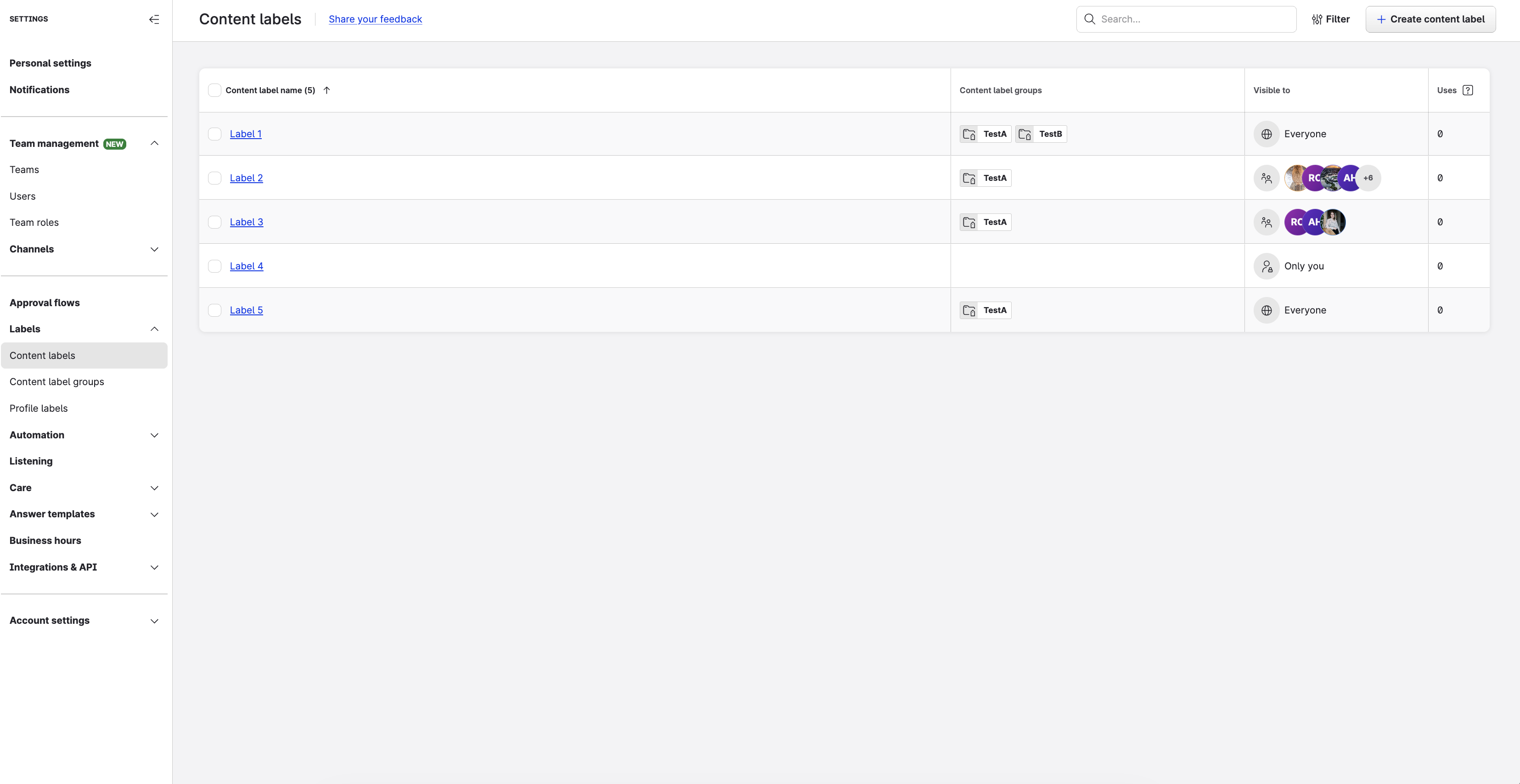
Each label type has its own list. Search, filter, and select several labels to change them at once. Click a label to open its details in a panel on the right, without leaving the list. The panel groups the label’s settings and its related items into tabs, so you can see at a glance who a label is visible to and what it’s assigned to.
Your labels, label groups, and permissions stay the same. Only the design changed.
This update applies to Teams accounts and to accounts that use the legacy governance model.
Learn more: https://docs.emplifi.io/platform/latest/home/how-to-set-up-labels
Export Ad Accounts data to a spreadsheet
Platform Admins can now export the Ad Accounts table (Settings > Channels > Ad Accounts) to a spreadsheet. The export reflects the current filtered state of the table, so you can scope it to exactly the data you need before downloading.
The exported file includes: ad account ID, name, platform, assigned teams, and the date and user who added the account.
This feature is available on Team accounts.
Learn more: https://docs.emplifi.io/platform/latest/home/ad-accounts
Unified Analytics
Share boards and saved views with Teams
You can now share dynamic boards and saved views with Teams in Unified Analytics. When you share with a team or an individual user, you set View mode or Edit mode. Whether someone can edit still depends on their Unified Analytics role permissions.
This update applies to Teams accounts and to accounts that use the legacy governance model.
Learn more: Share boards and saved views in Unified Analytics
Copy custom metric widgets from Dashboard to Unified Analytics
Custom metric widgets can now be copied from Dashboard to Unified Analytics when you use Copy to Unified Analytics.
Learn more: Copy a Dashboard to Unified Analytics
Listening
Set up and run Listening in the new Listening Hub
The new Listening Hub brings everything you need to set up and run listening in one place: an overview of your queries, the query builder, query sets, and spike alerts.
-
Home – See your running queries, spike alerts, trending topics on X, and AI-generated highlights at a glance.
-
Query builder – Create queries in a full-screen builder. Combine keyword conditions, use the NEAR operator, get AI keyword suggestions, and preview the estimated mentions before you save.
-
Queries and query sets – Pause, run, duplicate, and review the activity log of your queries, and group them into query sets.
-
Spike alerts – Get notified in product or by email when mentions spike.
This update applies to accounts with the Listening module.
Learn more: New Listening Hub - General Guide
Ratings and Reviews
Updated Seller Ratings Moderation with new filtering options
The Seller Ratings Moderation section has been refreshed, keeping the same look and feel as R&R Moderation and adding new ways to find the reviews you need.
You can now filter Seller Ratings reviews by:
-
Date range
-
Email address
You can also combine multiple filters to narrow down your results.
Important note:
The legacy version of Seller Ratings Moderation will be retired on February 3, 2027. We will allow users to switch back to the legacy version until December 30th, 2026. If you run into any issues with the new version, please contact our Technical Support team and provide as many details as possible.
Care
Create custom agent statuses that match how your team works
Care agents are no longer limited to Online, Away, and Offline. You can now create your own agent statuses, such as Lunch break, Training, or In a meeting, so that Care reflects what your agents are actually doing.
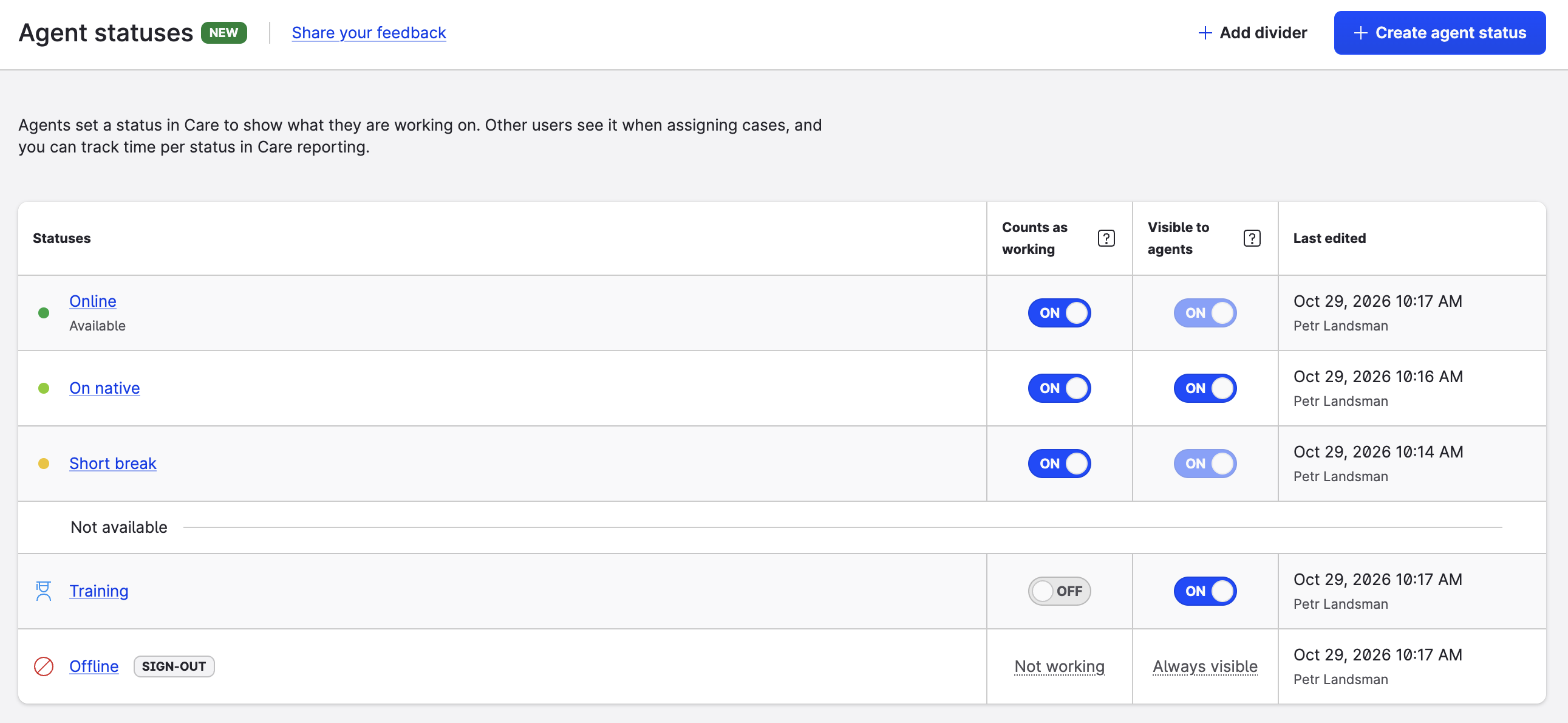
Your team sees each other's status and capacity at a glance in Team availability, and agents are reminded to switch to a working status when they start working in Care. Custom statuses also work with your automatic status changes and automatic case unassignment. Your existing statuses and automations keep working without any action.
Learn more: Set up agent statuses in Care and Control Your Online Presence and Status in Care