Flow Automations
Schedule a flow to activate and deactivate automatically
You can now schedule a flow to run only within a time window, such as a campaign or a seasonal promotion. In the flow canvas, click Schedule in the top toolbar and set a start date, an end date, or both. Both dates are optional and are shown in your account timezone.
A flow with a future start date shows the Scheduled status in the flow list and activates automatically at the start time. It deactivates automatically at the end time. Dates must be in the future and up to one month ahead. Changes made by a schedule are recorded in the audit log as "Due to workflow schedule". Duplicating a flow does not copy its schedule.
Learn more:
Author lists in flows
Flows can now recognize authors you want to treat differently, for example to skip an auto-reply. Three new actions are available in Community, Care Cases, and Care Messages flows:
-
Add author to list adds the author of the message or case to one or more author lists.
-
Remove author from list removes the author from one or more author lists.
-
Check author in list checks whether the author is on any list or on specific lists, and the flow continues on an In the list or Not in the list branch.
The Add and Remove actions can be followed by an Action-result condition to continue the flow based on the outcome. Author lists are currently created and managed by Emplifi. To create or change a list, contact your Customer Success Manager or Emplifi Support.
Learn more:
-
Community Add Author to List Action, Community Remove Author from List Action, Community Check Author in List Action
-
Care Add Author to List Action, Care Remove Author from List Action, Care Check Author in List Action
-
Care Messages Add Author to List Action, Care Messages Remove Author from List Action, Care Messages Check Author in List Action
Documentation updates
-
Escalate to Care (Community): clarified how Profile prioritization for mentions selects the Care case profile, including what happens when the author already has an open case on a different profile.
-
Unassign users (Care): the User status filter now lists all your agent statuses, including custom statuses you created.
Learn more:
Bot
Media Library Backend Improvements
The backend interface of the Media Library feature has been updated, making it easier to manage media collateral and their folder structures. The new interface will be smoother experience, updated in line with the same responsiveness as the main authoring canvas.
Translation V2 tooltip updates
The tooltip for the Translation V2 interface has been updated to make it clearer to users in what circumstances an export of existing translations will be available (only once, during the preliminary steps of the migration process). The Translation V2 interface itself is optimised for managing translations and updating/approving them, making exporting a list of translations a redundant step.
Unified Analytics Bot Overview Bug Fix
There were reports that the Unified Analytics dashboard was having issues with displaying data using the “this year” filter. This fix addresses and resolves that issue.
Social Analytics
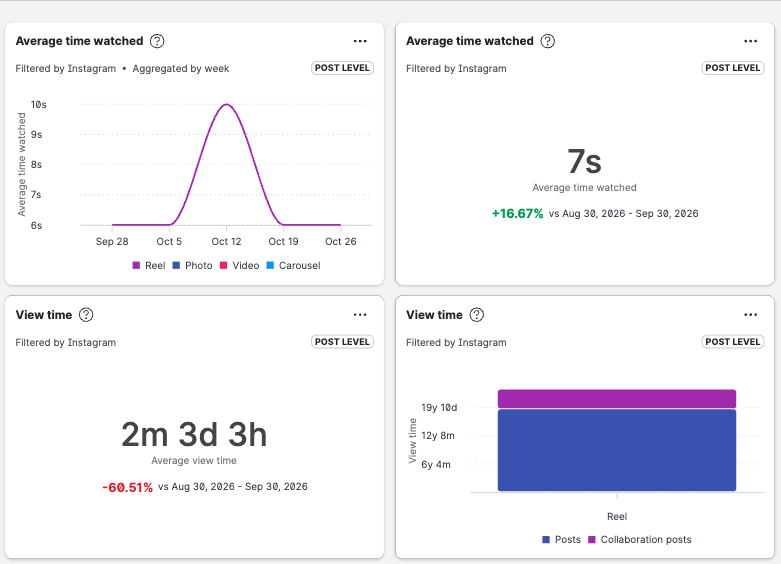
Instagram Reels watch time in cross-platform metrics
Average time watched and View time now include Instagram Reels in cross-platform reporting. Instagram support applies to Reels only; Meta does not provide these insights for Feed posts or Stories.
Available in Dashboard, Unified Analytics, Content Hub, and the Public API for Insights-connected Instagram profiles. Use the existing Average time watched and View time metrics. No new Instagram-only metrics were added.