
Care
Filter cases by assigned queue
You can now filter cases by their assigned case queue in the Care module and in saved views. A new Assigned case queue filter lets you see exactly which cases are waiting in a specific queue — not just the count, but each individual case along with its parameters. This helps supervisors and agents with the Manage Queues permission quickly identify unprocessed cases and understand why certain cases may not be getting picked up.
The Assigned case queue filter is available as a quick filter directly in the Care module and within the view configuration in Care Settings (Settings → Care → Views). You can select one or more queues to narrow the case list to only the cases that belong to those queues.
This feature is available for accounts using Flow Automation for case queue management.
Learn more: Create Case Views in Care
Bot
Agent Chat Widget - Experience Improvement
The Agent Chat widget user experience (used with webchat and the Emplifi Agent platform) has been updated and improved. The experience now has updated icons to better inform users of what specific actions mean, a resizeable text input field, a dedicated menu button for emoji usage in responses, in addition to a shortcut menu and button for using templated responses, including a fully searchable interface to allow easier access to specific templates.
%20(1).png?cb=5d3a98ac3f652676068bbaa945a8c94d)
%20(1).png?cb=194deadcdb48eed1397ee21114a71273)
Updated filtering options in the Bot “Conversations” tab
The filters available within the “Conversations” tab have been updated to align with the channels supported by the Bot platform, removing references to older channels that have been sunsetted or are otherwise no longer available.
Take & Reply Mechanism Interruption
The Take & Reply mechanism (used within the Emplifi Community product) had been observed behaving inconsistently when routing rules and intents had been activated post-escalation - allowing an interruption of conversations. This fix addresses that issue and removes any potential for conversation interruption post-escalation.
Default hyperlink contrast WCAG compliance
The default text colour contrast for hyperlinks used in webchat experiences has been updated to better align with WCAG standards and further improve accessibility standards.
“Expressions” Menu within Authoring not opening when clicked
The “Expressions” menu within the Authoring interface was reported to not be expanding when a user clicked on the text itself (but still expanded when clicking elsewhere on the menu item). This fix addresses that issue and restores the menu behaviour to its proper state.
Flow Automations
Organize and filter flows with tags
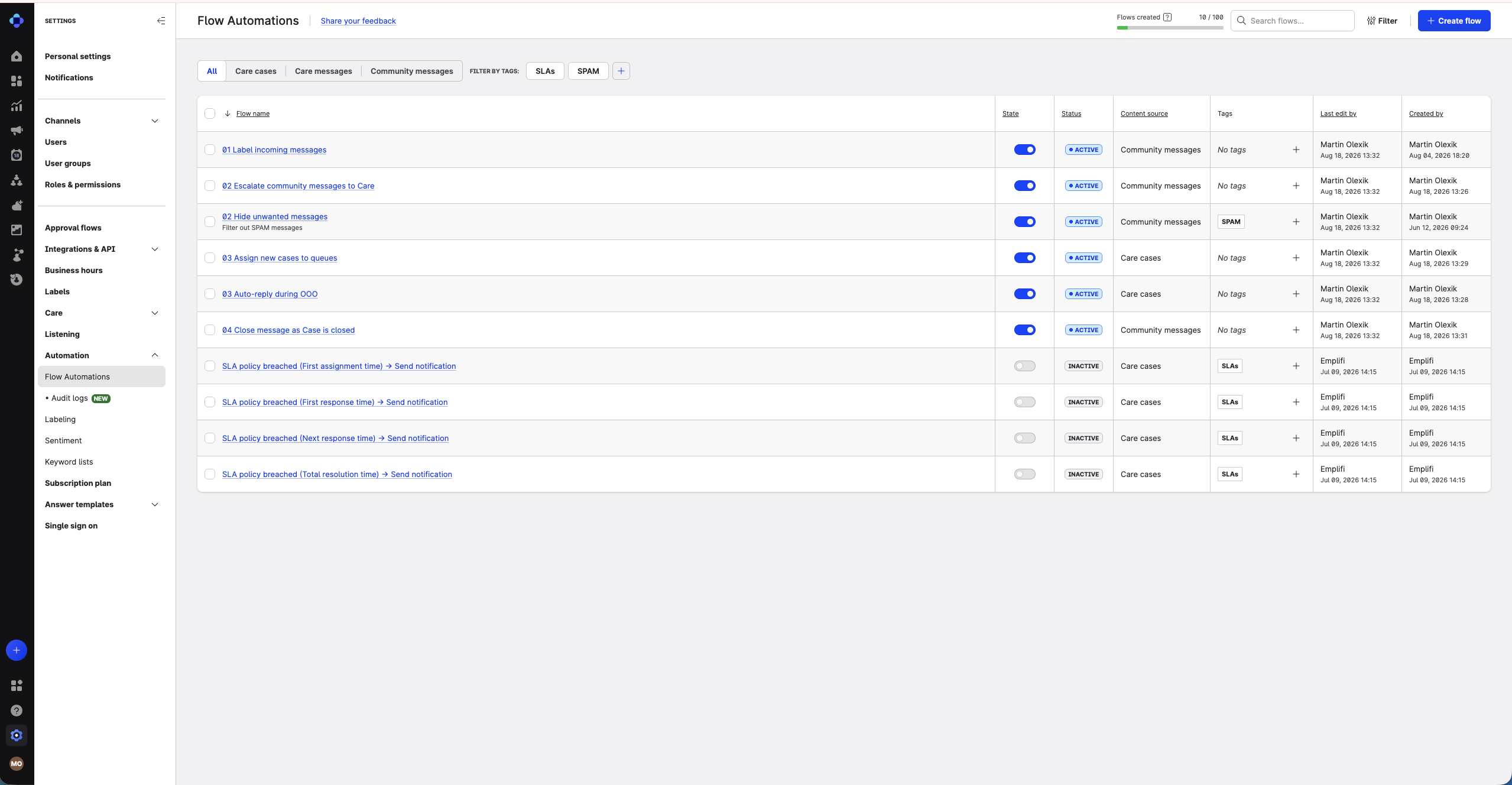
You can now assign user-defined tags to your Flow Automations to help organize and navigate large numbers of flows.
Tags appear in a new Tags column on the Flow Automations homepage. You can create tags directly from the tag selector, assign multiple tags to a single flow, and filter the flows list by one or more tags using the quick-filter chips above the table or the filter side panel.
Learn more: