
Platform
Assign teams to channels directly from the channel side panel
Platform Admins can now assign teams to social profiles, Google Business profiles, and ad accounts directly from the Channels section — without leaving the channel view to navigate to Team management.
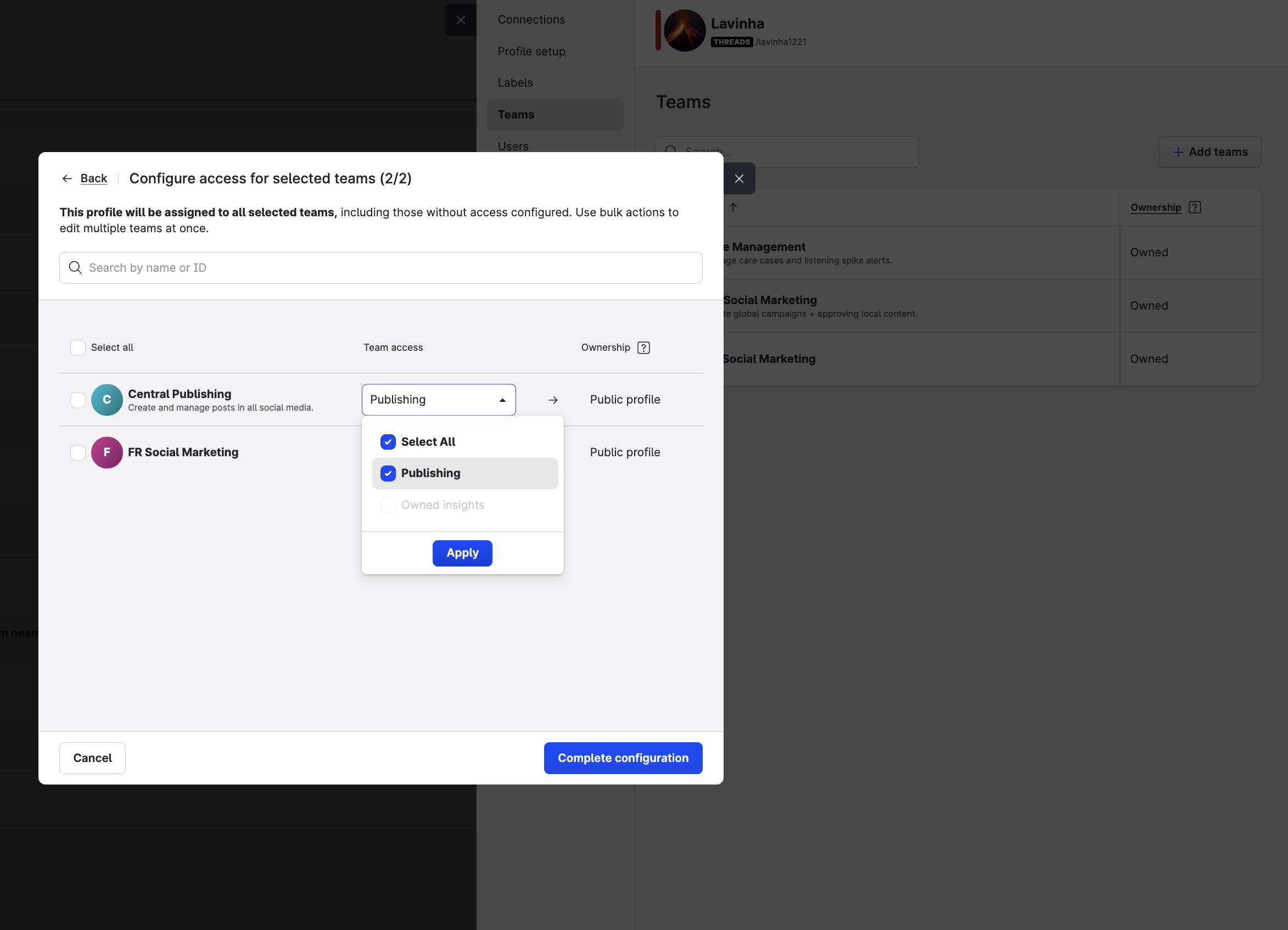
A new + Add teams button is available in the Teams tab of each channel's side panel:
-
Social profiles and Google Business profiles — a two-step flow lets you select the teams to add and then configure the access level for each (Publishing, Owned insights, Community management, and Care management). You can set access for all selected teams at once using the bulk action, or configure them individually.
-
Ad accounts — a single-step flow lets you select the teams to assign. No access level configuration is required for ad accounts.
In all cases, only teams you have permission to manage are shown.
This feature is available on Team accounts.
Learn more:
Add resources to the teams
Care
Correction to Resolved Cases and Total Resolutions metrics in Unified Analytics
We fixed an issue in Care reporting that could count a resolved case twice — once when it was resolved, and again when it was automatically closed after the grace period expired. This affected data from March 31, 2026 through August 28, 2026.
In Unified Analytics, Total Resolutions recorded an extra resolution for each case. Resolved Cases was affected only when the resolution and the automatic closure fell in different reporting periods, and not at all in accounts without a grace period.
Automatic closure no longer inflates either metric, and historical data has been corrected.
📝 Note: If you saved a report or exported data covering March 31, 2026 through August 28, 2026, run it again to see the updated figures. Corrected figures will be lower, because the affected metrics were previously overstated.
Flow Automations
Team-based access and permissions for Flow Automations
Flow Automations now supports team-based access control for accounts using the Teams feature. Each flow is assigned to a specific team, and access to Flow Automations is managed through team-level view and manage permissions — so you can control exactly who can see and edit flows within each team.
Users with view permission can see the flows assigned to their team but cannot create or modify them. Users with manage permission can create, edit, duplicate, and activate or deactivate flows. Users without either permission do not see Flow Automations in their account. Platform admins can view and manage all flows across all teams.
When building a flow, the resources available in the editor — such as managed profiles — are scoped to the team the flow belongs to. The team can be assigned during flow creation and changed later from inside the flow canvas. Team permissions for Flow Automations are configured in Settings → Teams → [Team name] → Product access.
This feature is available only for accounts with Teams enabled.
Learn more:
Social Analytics
Youtube views update
From August 24, 2026, YouTube counts a video view as soon as playback starts, from the first frame. That applies to long-form video and live streams. Shorts already use this rule (since March 31, 2025).
What you'll see in Emplifi: YouTube Video views may go up after August 24. That's expected. Emplifi shows what YouTube reports; we're not changing how we calculate the number.
Learn more: YouTube metric update (August 2026)