
UGC
PDP Rollup Analytics
PDP Rollup Analytics is now available in Emplifi UGC, giving teams a dedicated UNA board for PDP-only UGC performance reporting. The new dashboard isolates product display page activity from other widget placements and introduces three PDP-specific metrics — UGC Engagement Conversion, UGC Click Thru Demand, and Total UGC Engagement — so you can measure how UGC carousel interactions influence same-product purchases at the SKU level. Use the product selector to drill into individual products, compare engagement and conversion trends, and identify high-opportunity PDPs where stronger or more relevant UGC may help improve purchase follow-through.
Historical data is not backfilled for this release.
Publisher
🚀 Campaign Planning & UTM Parameter Automation
Campaign Planning UTM Parameter Automation is now available in Emplifi Publisher, helping teams create consistent, trackable campaign links with less manual setup. When planning campaigns, Publisher can automatically generate UTM parameters based on campaign details and configured naming rules, reducing copy-and-paste work and the risk of tagging errors across posts. This makes it easier for social and marketing teams to keep attribution data clean, compare performance across channels and campaigns, and connect published content to downstream analytics without rebuilding tracking URLs for every post.
What is new
Every post assigned to a campaign automatically inherits your configured UTM parameters, default content labels, and an immutable tracking label tied to the campaign's Unique ID, guaranteeing audit-proof attribution across every piece of content.
The UTM engine supports four dynamic variables — {SocialChannel}, {CampaignUniqueID}, {AssetID}, and {CountryID} — that resolve automatically at scheduling time, so a single multipost going out to Facebook, Instagram, and LinkedIn produces three distinct, correctly tagged URLs without any manual editing. Mix static text with dynamic variables to build composite values like BD~{CampaignUniqueID}_{AssetID}_MK~{CountryID}, giving your analytics team clean, parseable attribution data in Google Analytics, Adobe Analytics, or any BI tool.
Admins define campaigns and tracking strategies once; content managers simply pick a campaign from the post editor dropdown and publish — no UTM knowledge required. Built-in safeguards prevent scheduling outside the campaign date range, enforce unique IDs across the organization, and lock concurrent editing to avoid conflicts. Campaign deletion is soft, preserving full historical data for reporting and compliance.
Available on Enterprise plans. Contact your account manager if the Campaigns section is not visible in your Publisher calendar.
Learn more:
Campaign Planning & UTM Parameter Automation
Flow Automations
Audit Logs
Flow Automations now include an Audit Logs section that records the actions each flow has executed, along with their outcome. Administrators can use this to monitor automation behavior and quickly identify when and why an action failed — without needing to manually trace flow activity.
Each log entry shows the date and time of execution, the action that was triggered, and whether it succeeded or failed.
Learn more:
Audit Logs and Version History
Version History
Flow Automations now track a full version history for every flow. Each time a flow is saved, a new version is recorded. Users can open the Version History panel to browse past versions, preview how the flow was configured at any point in time, and restore a previous version if needed.
When a version is restored, the flow name and description are also restored. All previous versions remain accessible after a restore.
Learn more:
Audit Logs and Version History
Action-Result Conditions for Send Auto-reply
The Send auto-reply action in Community Flow Automations now supports Action-result conditions. After the action runs, the flow can branch based on whether the reply was sent successfully or failed.
To use this, add an Action-result condition node directly below the Send auto-reply action and configure branches for the following outcomes:
-
Success — The reply was published. Continue with follow-up actions such as labeling content or updating the message status.
-
Error — The reply could not be sent. Define a recovery path, such as retrying the action or routing to an alternative step.
This makes it possible to build self-healing workflows that handle send failures gracefully, rather than stopping silently when a reply cannot be delivered.
Learn more:
Community Send Auto-reply Action
Flow Automations now enabled by default for new accounts
Flow Automations are now enabled by default for all new accounts on the following solutions:
-
Essential (Social)
-
Advanced (Social)
-
Intelligent (Social)
-
Essential (Care)
-
Advanced (Care)
-
Intelligent (Care)
Ratings & Reviews
🚀 AI Review Summaries
We are excited to introduce AI Review Summaries, a powerful new addition to the Emplifi Ratings & Reviews suite. This feature automatically generates AI-written summaries of product reviews, synthesizing key themes, sentiments, and recurring mentions into an easy-to-read paragraph or bulleted list directly on your product pages.
By surfacing an aggregated, at-a-glance read of peer opinions, AI Review Summaries reduce time-to-insight for shoppers, improving buyer confidence and accelerating purchase decisions.
What's new
-
Automated Insights: Summaries are automatically generated for products (at the VPC or individual SKU level) once they accumulate a minimum of 50 reviews, ensuring highly reliable data.
-
Seamless Integration: Summaries are published directly to the Emplifi widget on your product detail pages (PDPs) or via the TurnTo API. If you are already using Emplifi widgets, no customer-side code changes are required.
-
Global Support: Summaries are not restricted to English; they are generated in the language defined by your site's default locale setting.
Learn more
AI Reviews Summaries
Bot
Messenger app editor updates
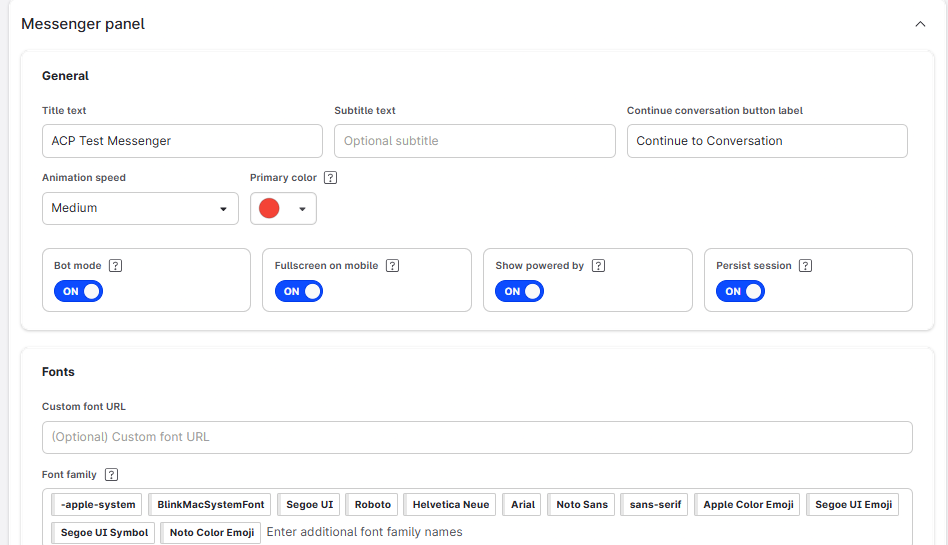
The editor interface for creating web messenger apps has been updated to provide a more consistent and easier to understand user experience, with better alignment to the design standards in the main Bot authoring interface. This update will make the process of altering settings and design specifications for a web messenger app much easier and a more responsive end-to-end experience.
Transcript variable updates
We have made some changes to the order of processing for the full transcript & messages transcript actions. This is to avoid instances where an error message was shown by mistake when using the “save transcript to variable” action (as reported in some isolated instances).
Javascript evaluation bugfix
An issue was noted with Javascript evaluation retaining context between expressions, causing later expressions in a chain to sometimes fail. This fix resolves this issue.
Analytics
-
Several Facebook unique reach metrics are being retired at the Meta platform level in June 2026. As part of this change, Emplifi is rolling out updated reach reporting across Content, Dashboard, Unified Analytics, and the Emplifi API. Read more here: Facebook Metric Deprecation (June 2026)