
This article provides definitions for all Care metrics available in Unified Analytics and explains how data attribution works. The metrics described here are used in Care preset boards available in Unified Analytics and are also available when building custom boards using dynamic boards.
For information about the preset boards and dynamic boards, see Use Unified Analytics to Analyze Performance of Your Care Operations
Available metrics
The following metrics are available in Unified Analytics for Care reporting. Each entry includes the metric definition and the data attribution type applied to it.
Case volume metrics
Created cases
-
The total number of cases created during the selected date range.
-
Data attribution: the case is attributed to the date when it was created and to the agent currently assigned to the case.
Assigned cases
-
The total number of cases assigned during the selected period.
-
Data attribution: the case is attributed to the date when it was assigned to an agent and to the agent assigned to the case within the time range.
Resolved cases
-
The total number of cases resolved (marked as Done or Spam) by the selected agents during the selected period. Cases resolved and reopened by the end of the reporting period are still counted as resolved within this metric.
-
Data attribution: the case is attributed to the date when it was resolved and to the agent assigned to the case when it was resolved.
Resolved & Stayed resolved cases
-
The total number of cases that were resolved (marked as Done or Spam) during the selected date range and remained resolved until the end of the date range.
-
Data attribution: the case is attributed to the date when it was resolved and to the agent assigned to the case when it was resolved.
Unresolved cases
-
The total number of cases in New, Open, Pending, or On Hold status as of the end of the selected date range.
-
Data attribution: the case is counted according to its state at the end of the selected date range and to the agent assigned to the case at that time.
Reopened cases
-
The total number of cases that were reopened at least once during the selected date range. Includes cases that transition from a resolved status (Done or Spam) to an active status (New, Open, On Hold, or Pending). Cases reopened multiple times within the date range are counted only once.
-
Data attribution: the case is attributed to the date when it was reopened and to the agent assigned to the case when it was reopened.
One-touch cases
-
The total number of cases resolved with a single agent reply. Includes cases where the reply was sent during the selected period and the case is currently resolved. Cases where the customer replied after the agent’s message are still considered one-touch cases.
-
Data attribution: the case is attributed to the date when the reply was sent and to the agent who sent the reply.
One-touch cases, %
-
The percentage of cases resolved with a single agent reply out of all cases that received replies. Includes cases resolved within the selected date range, regardless of when the reply was posted or when the case was created. If a case was resolved multiple times, only the final resolution within the date range is counted. Cases where the customer sent messages after the agent’s first reply are still classified as one-touch cases.
-
Data attribution: the case is attributed to the date when it was resolved and to the agent assigned to the case when it was resolved.
Avg replies per case
-
The average number of agent replies per case, considering only cases created during the selected date range that received at least one agent reply. This metric highlights the efficiency and complexity of agent-customer interactions.
-
Data attribution: the case is attributed to the date when it was created and to the agent currently assigned to the case.
Escalated SF cases
-
The total number of cases escalated to Salesforce during the selected date range.
-
Data attribution: the case is attributed to the date when it was escalated to Salesforce and to the agent assigned to the case at the time of escalation.
Review rating
-
The aggregated review score from reviews associated with cases created during the selected time period.
-
Data attribution: the case is attributed to the date when it was created and to the agent currently assigned to the case.
Handling efficiency metrics
Resolution time
-
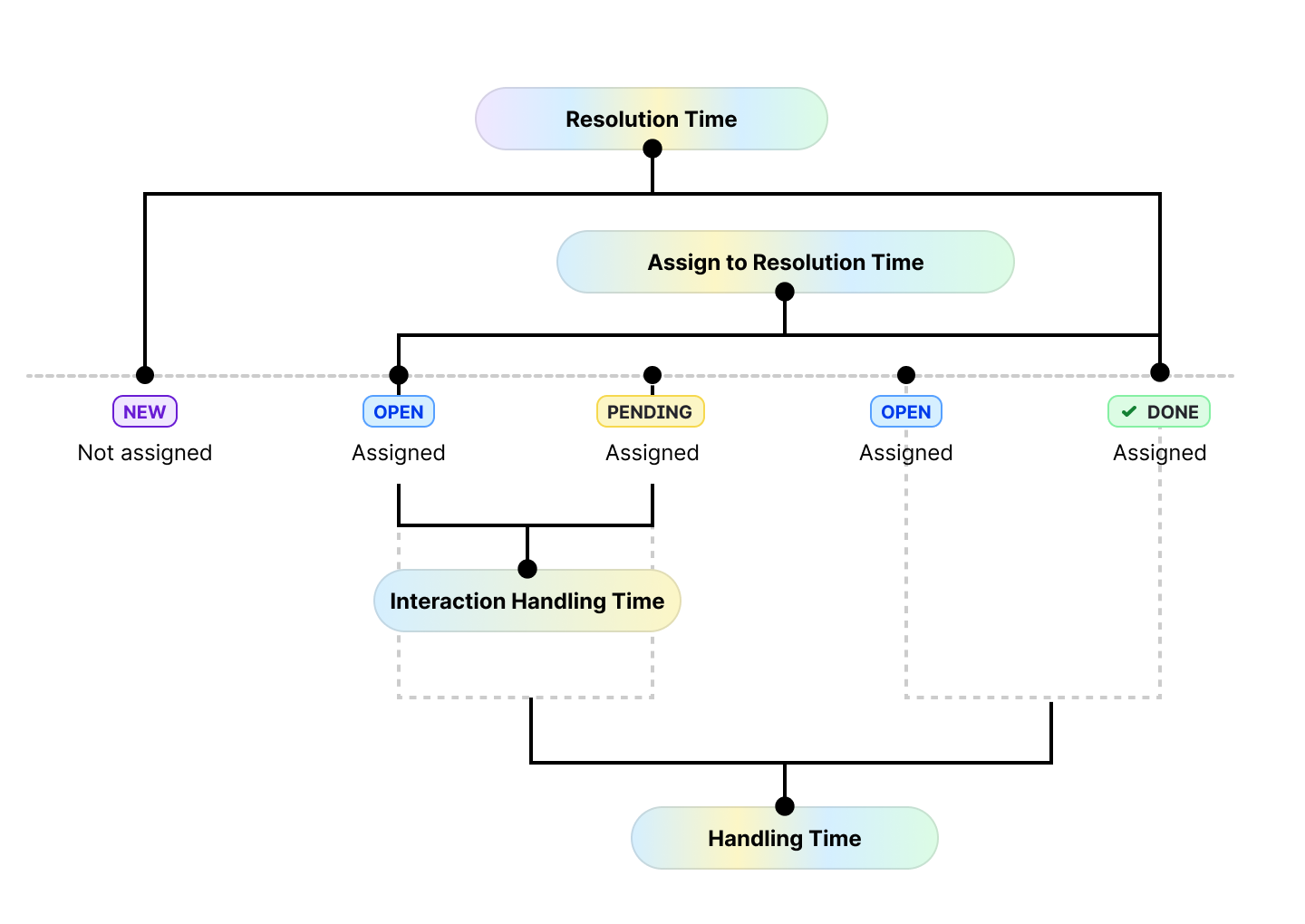
The time from case creation to the latest case resolution within the date range. Calculated based on cases that were resolved (marked as Done or Spam) during the selected date range and remained resolved until the end of it.
-
Data attribution: the metric is attributed to the date when it was resolved and to the agent assigned to the case when it was resolved.
Handling time
-
The time an agent actively works on a case until resolution. Time is counted only when a case is in Open status and assigned to the agent. If multiple agents worked on a case, each agent’s time is counted separately for the period when they were assigned. Excluded periods include the time when the case remains unassigned, as well as when it is in the states of Pending, On Hold, Done, or Spam status. Handling time accumulates across all instances of active work if the case is reopened and resolved again. The metric is based on cases resolved within the specified date range.
-
Data attribution: the metric is attributed to the date when it was resolved and to the agent assigned to the case when it was resolved.
Assign to resolution time
-
The time from case assignment to a specific agent to the latest case resolution during the selected period. Measured from the moment a case is assigned to an agent and excludes any periods when the case is not assigned to that agent. If an agent resolves the same case more than once, time is accumulated across all resolutions and attributed to the date of the latest resolution.
-
Data attribution: the metric is attributed to the date when it was resolved and to the agent assigned to the case when it was resolved.
Interaction handling time
-
The time it takes an agent to react to an open or reopened case in their queue, regardless of whether the case requires a reply. The timer starts when the case is in Open status and assigned to an agent, and stops when the case status changes to Pending, On Hold, Spam, or Done with the agent assigned. Designed to assess agent responsiveness to incoming cases.
-
Data attribution: the metric is attributed to the date when the agent changed case status and to the agent assigned at that moment.
Response time metrics
First response time
-
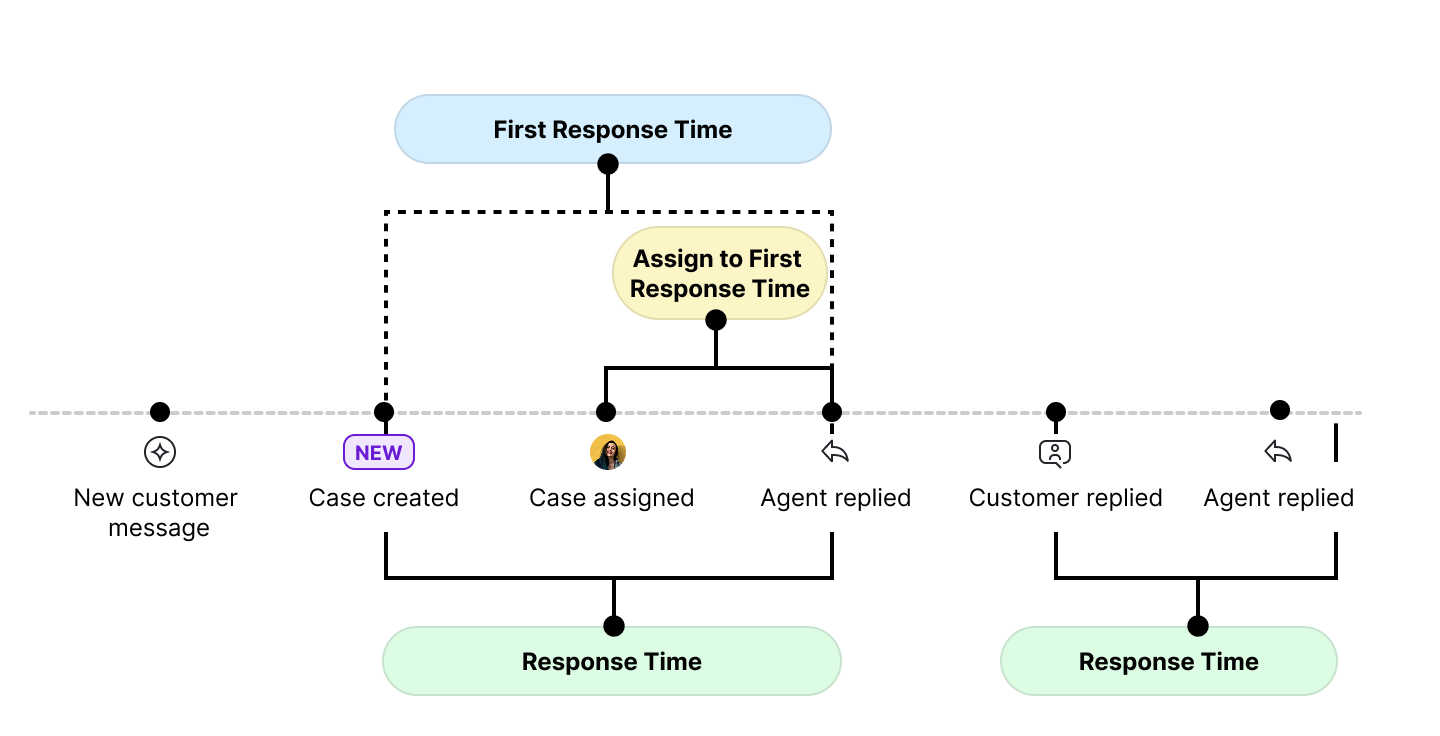
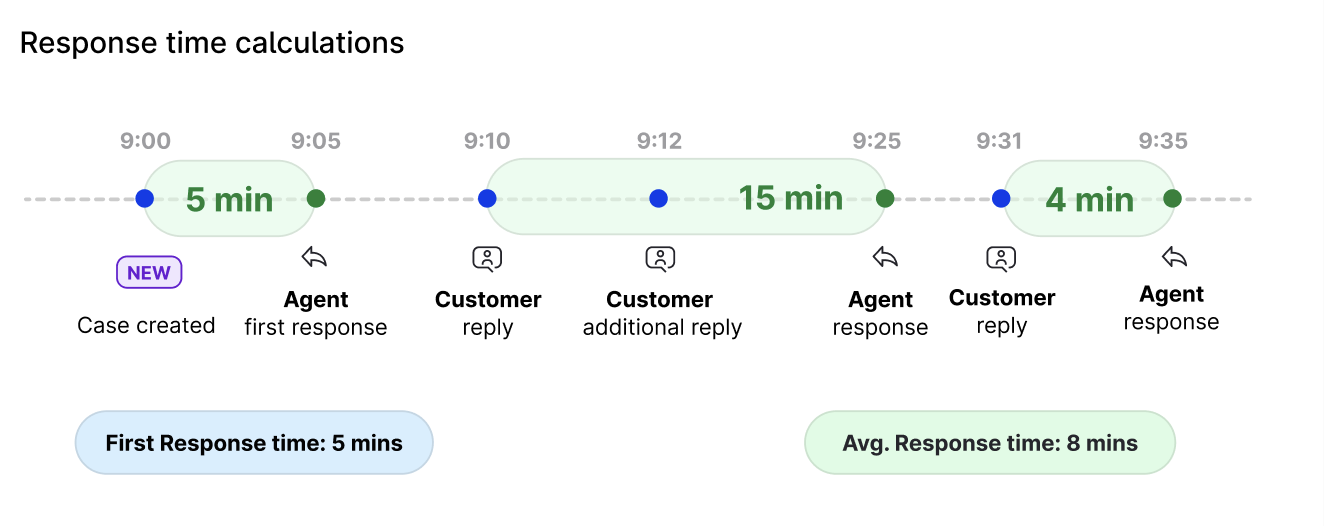
The time it takes for an agent to post their initial reply to a case, measured from case creation to the posting of the first agent message. Only cases that received their first agent response within the selected date range are included, regardless of when the case was created or resolved.
-
Data attribution: the metric is attributed to the date when the reply was sent and to the agent who sent the reply.
Assign to first response time
-
The time it takes for an agent to post their initial reply to a case after being assigned to it. If an agent is assigned to the same case multiple times, first response time is calculated for each assignment. Only agent first responses posted within the selected period are included.
-
Data attribution: the metric is attributed to the date when the reply was sent and to the agent who sent the reply.
Response time
-
Time it takes for an agent to respond to a customer's message within a case. It is calculated by measuring the time between the oldest unanswered customer message in the conversation and the agent's subsequent reply. Only agent responses posted within the selected date range, along with their respective response times, are included.
-
Data attribution: the metric is attributed to the date when the reply was sent and to the agent who sent the reply.
Agent activity metrics
Total assignments
-
The total number of times cases were assigned to an agent during the selected period. If a case is assigned multiple times, it is counted multiple times.
-
Data attribution: the case is attributed to the date when it was assigned to an agent and to the agent assigned to the case within the time range.
Total resolutions
-
The total number of times cases were resolved during the selected period. If a case is resolved multiple times, it is counted multiple times.
-
Data attribution: the case is attributed to the date when it was resolved and to the agent assigned to the case when it was resolved.
Cases replied to
-
The number of cases that received one or more agent replies during the selected date range. Cases are included if they contain agent replies within the specified period, regardless of their status or assigned agent at the time. Includes any agent reply, including the first reply.
-
Data attribution: the case is attributed to the date when the reply was sent and to the agent who sent the reply.
Replies sent
-
The total number of replies sent during the selected date range. Deleted replies are also included.
-
Data attribution: the case is attributed to the date when the reply was sent and to the agent who sent the reply.
Internal notes sent
-
The total number of internal notes created during the selected date range.
-
Data attribution: the metric is attributed to the date when the note was created and to the agent who created the note.
Reactions
-
The total number of likes and reactions sent during the selected date range.
-
Data attribution: the case is attributed to the date when the action was taken and to the agent who took the action.
Other actions
-
The total number of other actions performed during the selected date range. Includes: message hidden or unhidden, message deleted, and user banned (YouTube only).
-
Data attribution: the case is attributed to the date when the action was taken and to the agent who took the action.
SLA metrics
Total cases with SLA
-
The total number of cases created within the selected date range where an SLA policy was applied.
-
Data attribution: the case is attributed to the date when it was created and to the agent currently assigned to the case.
Cases with SLA achieved
-
The number of cases created within the selected date range where an SLA policy was applied and no SLA milestone was breached.
-
Data attribution: the case is attributed to the date when it was created and to the agent currently assigned to the case.
Cases with SLA breached
-
The number of cases created within the selected date where at least one SLA milestone was breached.
-
Data attribution: the case is attributed to the date when it was created and to the agent currently assigned to the case.
Cases with active SLA
-
The number of cases with at least one open SLA milestone, whether breached or not, where the SLA clock was still running at the end of the selected date range. Especially useful when the date range ends at the present moment, as it reflects cases that require timely attention.
-
Data attribution: the case is counted according to its state at the end of the selected date range and to the agent assigned to the case at that time.
Cases with active SLA breach
-
The number of cases with at least one open SLA milestone that has already exceeded its target time and where the SLA clock was still running at the end of the selected date range. Especially useful when the date range ends at the present moment, as it reflects cases that require timely attention.
-
Data attribution: the case is counted according to its state at the end of the selected date range and to the agent assigned to the case at that time.
SLA breach rate
-
The percentage of cases where at least one SLA milestone was breached before closure, relative to all cases where an SLA policy was applied. Calculation: (Cases with at least one breached SLA milestone before closure) ÷ (Cases with SLA) × 100.
-
Data attribution: the case is attributed to the date when it was created and to the agent currently assigned to the case.
Achieved milestones
-
The number of milestones closed within the target timeframe, before breaching.
-
Data attribution: the milestone is attributed to the date when it was closed and to the agent assigned to the case when the milestone was completed.
Breached milestones
-
The number of milestones that were closed as breached, for example, a reply was sent or the case was resolved later than target time.
-
Data attribution: the milestone is attributed to the date when it was closed and to the agent assigned to the case when the milestone was completed.
Active breaches
-
The number of milestones running at the end of the reporting period as breached and not yet closed. When filtered to “Today,” this reflects the current volume of breached milestones that may require action.
-
Data attribution: the case is attributed to its state at the end of the selected date range and to the agent assigned to the case at that time.
Breach events
-
The number of milestones that began breaching by exceeding their target timeframe within the selected period.
-
Data attribution: the milestone is attributed to the date when it was breached and to the agent assigned at the time the breach started.
Milestone achievement rate
-
The percentage of closed milestones that met the target timeframe, relative to all closed milestones.
-
Data attribution: the milestone is attributed to the date when it was closed and to the agent assigned to the case when the milestone was completed.
Milestone breach rate
-
The percentage of closed milestones that breached the target timeframe, relative to all closed milestones.
-
Data attribution: the milestone is attributed to the date when it was closed and to the agent assigned to the case when the milestone was completed.
Completion time
-
The average time taken to close SLA milestones (e.g., send reply, resolve a case), regardless of whether they were met within the target timeframe or breached.
-
Data attribution: the milestone is attributed to the date when it was closed and to the agent assigned to the case when the milestone was completed.
Breached time
-
The average duration milestones remained in breach before being closed.
-
Data attribution: the milestone is attributed to the date when it was closed and to the agent assigned to the case when the milestone was completed.
Achieved time
-
The average duration required to close a milestone within the target timeframe.
-
Data attribution: the milestone is attributed to the date when it was closed and to the agent assigned to the case when the milestone was closed.
Data attribution
Data attribution defines how individual data points are categorised and assigned to specific timeframes or events within the lifecycle of a Care case. By applying consistent attribution rules, Unified Analytics ensures that metrics are calculated and visualised in a predictable and meaningful way.
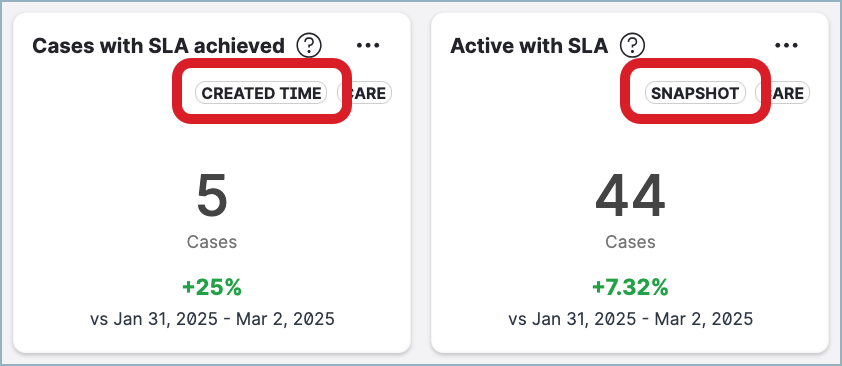
Each widget on a Care board uses one of the attribution types described below. Widgets display a badge indicating the attribution type they use, which helps you interpret the data correctly.
Data attribution can reflect a specific event in the lifecycle of a case (such as when it was created, replied to, or resolved), the state of a case at a given point in time (snapshot), or an action taken by an agent.
Actioned at
-
Care cases are attributed to the date when a specific action was taken within the selected time range and agent who took the action.
Agent status
-
This attribution type shows data based on the status of Care agents — online, away, or offline — at a specific moment or within a specific time range.
Assigned at
-
Care cases are attributed to the date when they were assigned to a Care agent and to the agent assigned to the case within the time range.
Created at
-
Care cases are attributed to the date when they were created, regardless of any subsequent actions, and to the agent currently assigned to the case.
Escalated at
-
Care cases are attributed to the date when they were escalated to Salesforce and to the agent assigned to the case at the time of escalation.
Handled at
-
Care cases are attributed to the date when the agent handled the case and to the agent assigned to the case when it was handled.
Milestone breached
-
This attribution type applies to SLA breach events within the selected time range:
-
Breach events (SLA milestones that began breaching within the time range) are attributed to the date when they exceeded the target timeframe, and to the agent assigned when the milestone was breached.
-
Active breaches (SLA milestones running as breached at the end of the time range) are attributed to the date when the breach timer began, and to the agent assigned at the end of the time range. When filtered to “Today,” active breaches reflect the current number of Care cases with breached SLA that may require agent action.
-
Milestone closed
-
SLA milestones are attributed to the date when they were last closed within the selected time range. If a milestone was reactivated, the data reflects its most recent closure, even if it had previously been closed before the selected time range. This ensures that only the final closure state is considered.
Reopened at
-
Care cases are attributed to the date when they were reopened and to the agent assigned to the case when it was reopened.
Replied at
-
Care cases are attributed to the date when replies were sent to customers and the agent who sent these replies. This attribution type tracks agent or system responses regardless of when the case was created or resolved, reflecting communication activity tied to the response timestamps.
Resolved at
-
Care cases are attributed to the date when they transitioned to the status of Done or Spam within the selected time range. For all metrics except Resolved cases, this attribution type counts only cases that were resolved during the specified time range and remained resolved until the end of it. For the Resolved cases metric, this attribution type counts both cases that remained resolved until the end of the specified time range and cases that were reopened before the end of it. It captures the last time a case was resolved within the time range and includes cases created before the time range.
Snapshot
-
This attribution type provides a static view of data at the end of a specific time range, or at the end of time intervals for widgets displaying trends over time. It disregards when Care cases were created, reopened, or resolved, offering a point-in-time perspective that is particularly valuable for identifying trends, auditing, and maintaining a consistent historical record. Care cases are attributed to the agent assigned at the end of this time range.