
Summary: This article outlines the roles and access levels within an Emplifi account, detailing the permissions of platform admins and platform users. Platform admins have comprehensive access to all modules and settings in an Emplifi account. Platform users have limited access, restricted to their personal settings within the Emplifi account.
A user in an Emplifi account can be granted one of the following levels to the Emplifi platform:
-
Platform admin
Platform admins can access all the modules of the Emplifi account and manage the Emplifi account itself and all its assets:-
Add/delete profiles and ad accounts to/from the account.
-
Invite/delete users to/from the account.
-
Create and delete teams, set up product access in each team, add users to the teams, create team role templates.
-
Manage collaboration between teams (in restrictive accounts).
-
Add/delete content and profile labels to/from the account, edit all shared labels and label groups.
-
Configure the account settings such as SSO and system integrations.
-
Set up and manage all automated labeling rules.
-
Set up and manage Flow Automations.
-
Change the profile and ad account colors and the profile timezone.
-
Turn on automated sentiment for new profiles added to the account.
-
View the subscription plan and billing information.
-
-
Platform user
Platform users can access only their personal settings in the Emplifi account.
To find out what level of platform access a user is granted, go to Settings -> Users, and check the Platform access column.
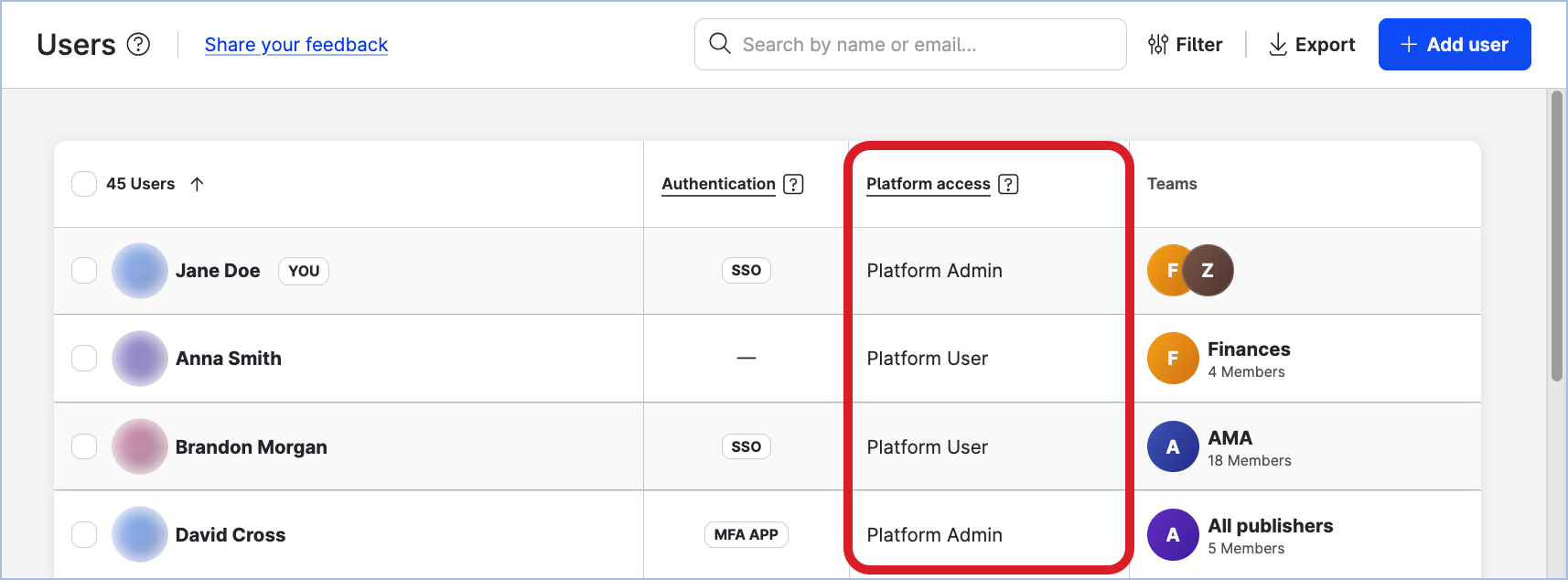
Considering the wide scope of permissions and full access to the account settings, having one to three platform admins per account is sufficient. All the other users should be platform users, who are granted access to the modules of the Emplifi platform and to the resources via teams.
Platform access vs. Team access
Platform admins and platform users exist outside of the team setup. Platform access determines access to the account-level settings. Teams determine access to the resources in the account.
To be able to access the resources (such as profiles and ad accounts) and access and interact with the resource data, the user must be added to a team (see Govern Access to Account Resources Using Teams).
A user not added to any team has no access to the resources and the resource data in the Emplifi account.
-
Platform admins will be still able to access any module of the Emplifi platform and see all the teams, team roles, resources, and the other users under Settings → Team management. However, they will not be able to access and interact with the resource data in the Emplifi modules.
-
Platform users will not be able to access any module of the Emplifi platform, see any resource, team, team role, or user in the Emplifi account. They will be able to access only their personal settings.