The Delay action element for Care Flow Automations pauses the flow for the specified time before processing the next node in the flow.
Delay for
The amount of time to delay the flow before processing the next node. Enter a delay between 10 minutes and 14 days. Use d for days, h for hours, and m for minutes (for example, 2d4h30m).
If the Delay action is hit again before the delay period completes — the delay resets and starts counting down from the beginning.
Because this action only delays the flow, it cannot be the last action element in a flow.
Using multiple Delay actions in the same flow
A flow can include more than one Delay action, either in sequence within the same path or in separate branches. The behavior when the flow is triggered again depends on the structure of the flow and which delay the case has reached.
-
Delays in the same path — first delay still active: If the flow is triggered again while the first delay is still counting down, the timer resets and the first delay starts again from the beginning.
-
Delays in the same path — first delay already completed: If the flow is triggered again after the first delay has completed and the case has moved on to a subsequent delay, the subsequent delay continues without resetting. Once it completes, the remaining actions execute. If the flow is triggered again in the future, the actions execute again based on that later trigger.
-
Delays in separate branches: If the flow splits into branches and each branch contains its own Delay action, triggering the flow again resets all active delay timers across all branches, regardless of how much time has elapsed on each.
Examples
Sequential delays in one path
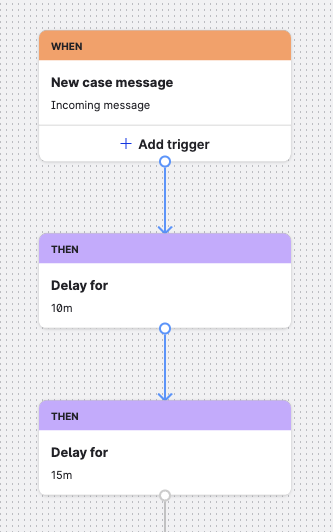
A flow contains a 10-minute delay followed by a 15-minute delay:
-
When the trigger fires, the 10-minute delay starts.
-
If the trigger fires again before the 10 minutes elapse, the 10-minute delay resets.
-
Once the 10-minute delay completes, the 15-minute delay starts.
-
If the trigger fires again while the 15-minute delay is active, the delay continues without resetting. The subsequent actions execute when the 15 minutes complete, and the case may trigger the actions again if the flow fires once more after that.
Delays in separate branches
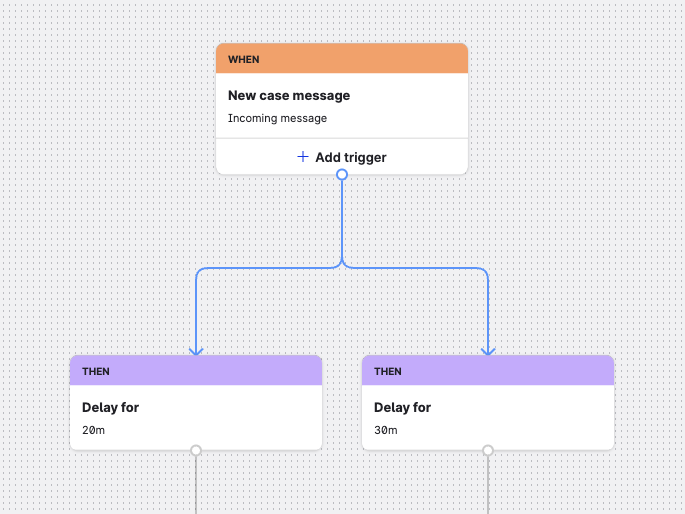
A flow splits into two branches after the trigger — one branch has a 20-minute delay, the other has a 30-minute delay:
-
When the trigger fires, both delays start simultaneously in their respective branches.
-
If the trigger fires again while either delay is still active, both timers reset and start counting down again from the beginning.